NQ futures trading journal
An NQ futures trading journal for Nasdaq traders
daqverse is a trading journal built for ICT and prop-firm futures traders: it tags every trade with its New York kill zone and tracks each prop account's drawdown rules. NQ moves fast: a quarter-point tick is worth $5 on one E-mini contract and $0.50 on a micro, and a busy New York morning can cover a hundred points. A useful journal for the Nasdaq has to get the contract math right without you thinking about it, date every trade on the New York trading day and show you the levels the market keeps returning to.
daqverse does all three. Pick NQ or MNQ, type the prices, and the points, ticks, R and dollars are worked out from the contract's own specification. Each trade is tagged with its New York session and kill zone, and the key NQ levels arrive by themselves every day.
Updated
Who it is for
NQ and MNQ day traders
E-mini or micro, continuous or a dated contract, one contract or a scaled position with partial exits.
Traders of the New York open
Most of your trades happen between 09:30 and 11:30 New York time and you want to know how they compare with London and the afternoon.
Prop firm futures traders
Your NQ trades sit on evaluation or funded accounts with a trailing floor and a daily loss limit.
Traders of the other index and commodity futures
ES, YM, CL and GC and their micros are built in too, each with its own point value.
What the journal does for NQ
Every part below is in the app today. The pictures show daqverse's sample data and its NQ level feed, never a real account.
Contract math done for you
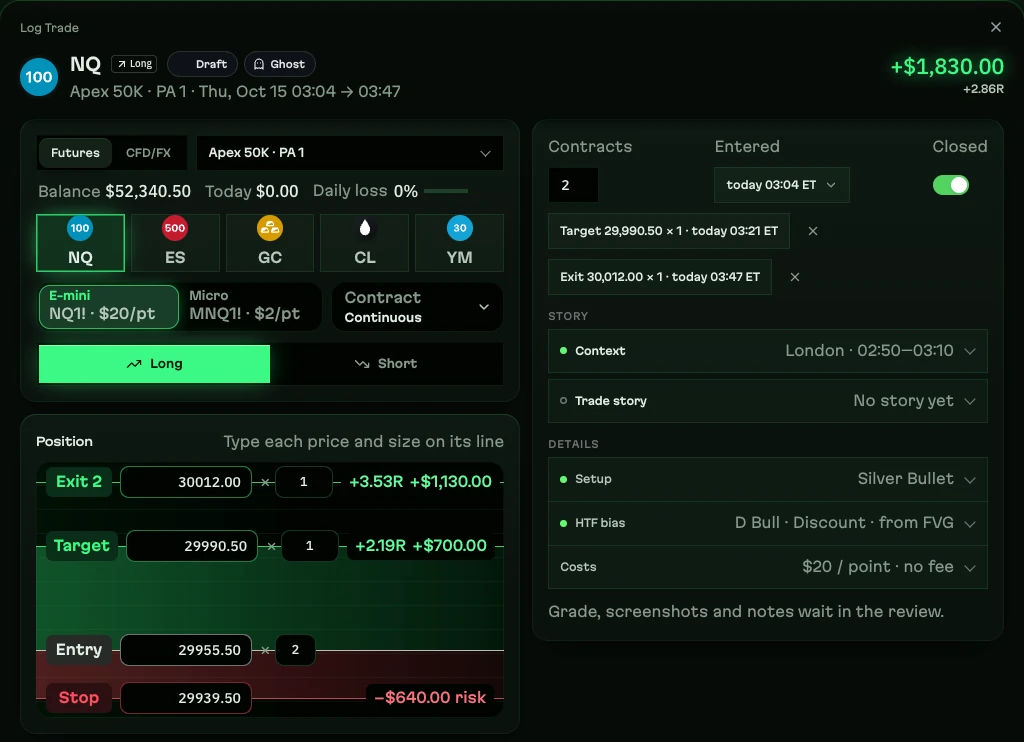
daqverse carries the contract specifications for NQ and MNQ (and ES, YM, CL, GC and their micros), checked against CME Group's: NQ is $20 a point and $5 a tick, MNQ $2 a point and $0.50 a tick. Choose the continuous contract (NQ1!) or a dated one such as NQZ2026; both are recognised as NQ.
On the ticket, entry, stop, target and each exit sit on one price ladder with their own size. Risk in dollars, R and P&L update as you type, scaled exits are separate lines, and the fees you enter come off the result. If you would rather keep the P&L your broker reported, the ticket keeps that instead.
Futures position size calculator
Every trade on the New York trading day
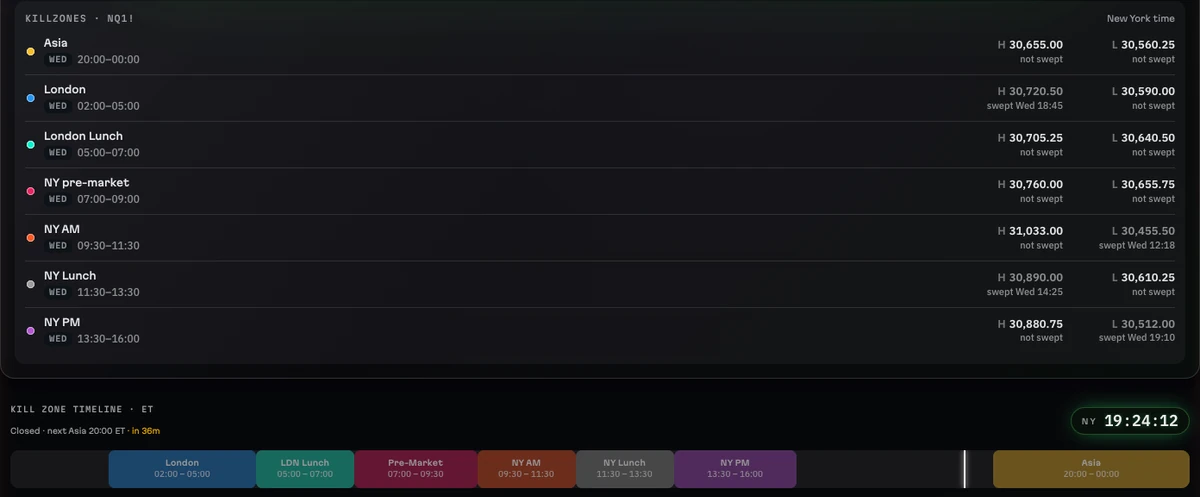
Futures trades are dated in New York time, wherever you live, so your Monday is the market's Monday. Each trade is tagged from its entry time with its kill zone (Asia, London, New York AM, New York lunch or New York PM) and its ICT macro window, so you can compare the 09:30 open with the London session on your own numbers.
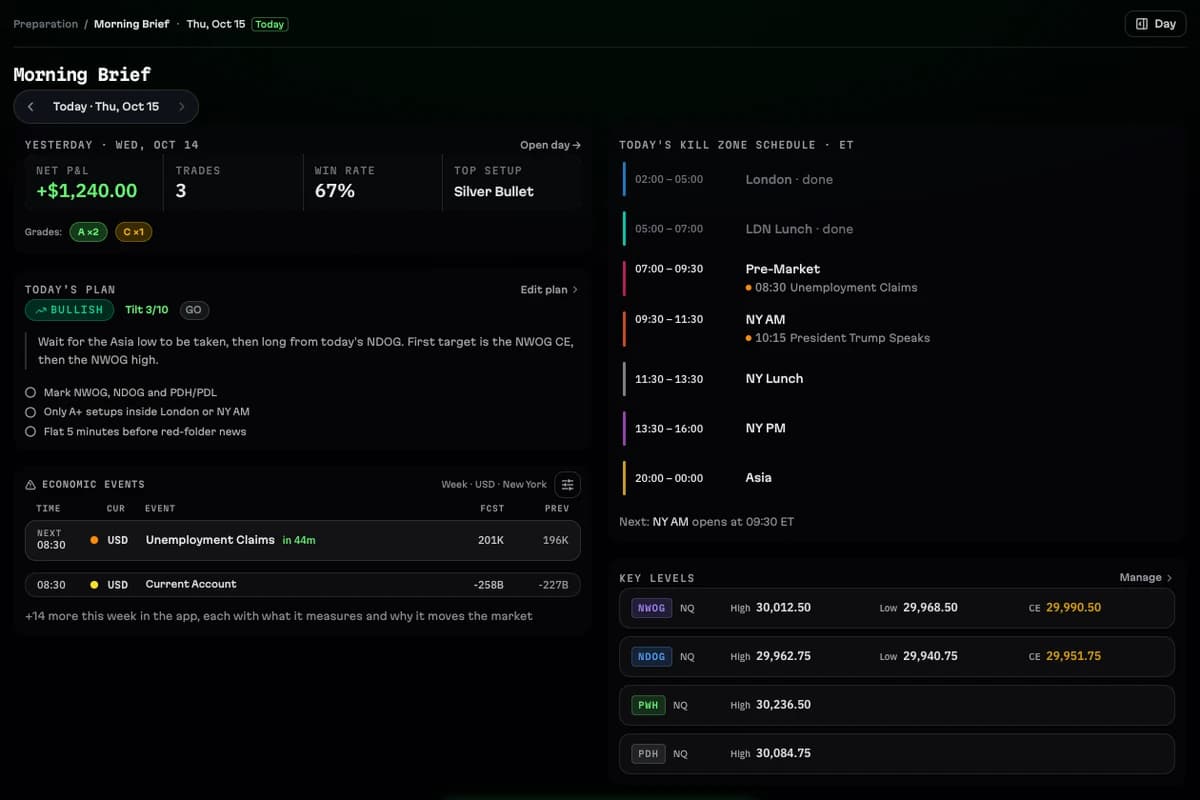
Market holidays and the US economic calendar are built in: the Morning Brief counts down to the next high-impact release, and the community Discord posts the week's USD news every Sunday.
NQ key levels that arrive by themselves
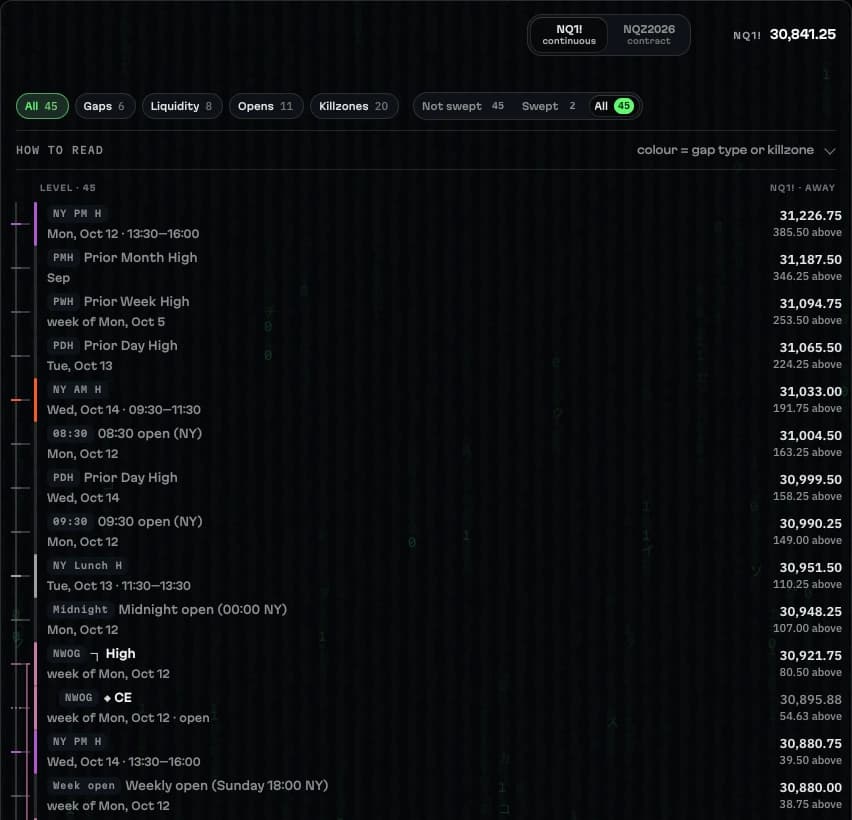
A TradingView script sends the NQ levels to daqverse through the day, for the continuous chart and the current contract: the prior day, week and month highs and lows, each kill zone's high and low, the NWOG, the NDOG and the regular-hours gap with their CE and quarters, and the midnight, 08:30 and 09:30 opens, each marked when it is swept.
Key Levels sorts them by price with the distance from the last price, Live Session shows the nearest ones above and below, and a trade can carry the levels it was taken from.
Tradovate imports and a fast Quick Log
Log a trade in seconds after the close, or import a Tradovate CSV: fills are matched first in, first out per broker account and contract, open quantity at the end of the file is reported instead of guessed, every refused row is listed before anything is saved, and re-importing the same file adds nothing.
Plan the session, then review it
Before the open the Morning Brief shows yesterday's result, today's plan, the news and the NQ levels; the Daily Plan ends in GO or NO-GO. After the close, Session Review and the Journal close the day, and Weekly Review compares the week with the plan you made on Sunday.
Analytics then groups your NQ trades by kill zone, macro, setup, direction or any of twenty-odd fields, so you can see whether the open, the afternoon or one setup carries your results.
Prop account limits beside the trades
If your NQ trades sit on prop accounts, each account keeps its drawdown rule, daily loss limit, profit target, consistency rule and payout days, and the room left updates with every trade you log. The numbers are estimates from your trades, not your firm's official figures.
An NQ session in daqverse
Step 1
From 07:00 New York time
Read the Morning Brief: the 08:30 news, the overnight levels and your plan.
Step 2
09:30 open
Live Session shows the NY AM kill zone, the next macro and the nearest NQ levels.
Step 3
After each trade
Log it; points, ticks, R and dollars come from the contract, the kill zone from the clock.
Step 4
After the close
Import the Tradovate file if you prefer, grade the trades and close the day.
Step 5
Each week
See how the open, London and the afternoon compared on your own NQ trades.
What daqverse does not do
- daqverse has no live price feed and no broker connection: trades come from the Quick Log or an exported file.
- The NQ level feed is a convenience and can be late; your own chart stays the reference.
- Nothing here is financial advice, and no session or setup is promised to make money.
Questions
How much is one point on NQ and MNQ?
One point on the E-mini Nasdaq-100 (NQ) is $20 per contract, and the smallest move, a quarter point, is $5. On the Micro E-mini (MNQ) one point is $2 and a tick is $0.50. daqverse uses these values to work out risk, R and P&L for every NQ and MNQ trade.
Can daqverse import my NQ trades from Tradovate?
Yes. A Tradovate CSV is imported into the account you choose: fills are matched first in, first out per broker account and contract, the preview shows what will be saved and what was refused, and importing the same file twice adds nothing new.
Does it work with the continuous contract and dated contracts?
Yes. You can log against NQ1! (saved as NQ) or a dated contract such as NQZ2026; both count as NQ in your statistics.
Which day is a trade taken in the Asia session saved under?
Futures trades are dated by their New York date. The kill zone levels follow the trading day they are used for, so the Asia session that starts at 20:00 New York time belongs to the next day's levels.
Does daqverse connect to my broker or my prop firm?
No. There is no live broker connection and no market data feed. Trades come in through the Quick Log right after the close, a Tradovate CSV for futures accounts, or a statement file (MT4, MT5, cTrader, Match-Trader and others) for forex and CFD accounts. Statement files are read in your browser and never uploaded.
Does it work on a phone?
Yes. daqverse is a web app built at phone width first, so it runs in the browser on a phone or a computer with nothing to install, and you can add it to your Home Screen.
How do I get access, and what does it cost?
daqverse is in early access. You request a place with a Gmail address and what you trade, and invites go out by email in small groups. It costs nothing while you are in the beta and no card is asked for. Paid plans are not open yet; beta testers get a discount when they open.
Journal your next NQ session in daqverse
daqverse is in early access: request a place and we email you an invite. Already invited? Log in.
Keep exploring
- ICT trading journalA trading journal for ICT traders: every trade tagged with its New York kill zone and macro, a daily plan, a live session view and reviews by setup.
- Prop firm trading journalA journal for prop firm futures traders: each account's drawdown floor, daily loss limit and payout rules tracked from your own trades, as you set them.
- Futures position size calculatorHow many contracts for your risk: enter dollars at risk and your stop in points or ticks for NQ, MNQ, ES, MES, YM, GC or CL. Free, no sign-up.
- ICT kill zone clockThe ICT kill zones and macros in New York time, live: which window is open now, the next one with a countdown, and the times in your own time zone.
- ICT kill zonesWhat the ICT kill zones are, their New York times (Asia, London, New York AM and PM), why they move with daylight saving, and how to journal them.
- Best trading journal for ICT tradersTradeZella, Tradervue, Edgewonk, TraderSync and daqverse compared for ICT and prop firm futures traders: what each does well, checked on their own sites.