Prop firm trading journal
A prop firm trading journal that watches your drawdown
daqverse is a trading journal built for ICT and prop-firm futures traders: it tags every trade with its New York kill zone and tracks each prop account's drawdown rules. A prop account rarely fails on one bad idea. It fails on the trade you took without knowing the floor had moved up, or on the day you forgot the daily loss limit resets at a different hour. daqverse keeps each account's rules next to its trades, works out where the limits sit after every trade you log, and shows the room left before you take the next one.
You type the rules in, stage by stage, the way your firm writes them. The journal then does the arithmetic you would otherwise do in a spreadsheet: the trailing floor, the daily loss, the profit target, the consistency rule and the days you still need before a payout.
Updated
Who it is for
Futures traders on evaluations and funded accounts
One account or ten, at one firm or several, each with its own plan, size and stage.
Traders who have lost an account to a rule
You want the trailing floor, the daily limit and the consistency rule in front of you before the next trade, not in an email after it.
Forex and CFD prop traders
Accounts in USD, EUR or GBP, with the daily limits counted on the firm's own day rather than yours.
ICT traders with a prop account
The same journal tags every trade with its New York kill zone, so you can see which sessions help or hurt the account.
How daqverse tracks a prop account
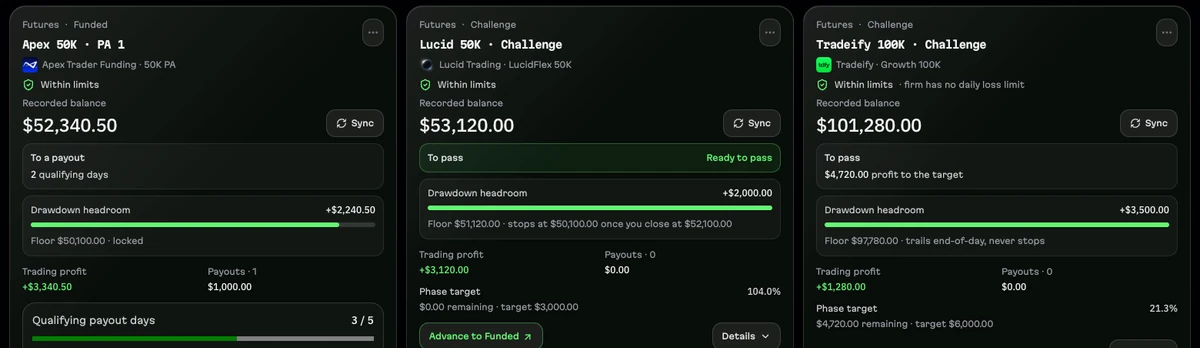
Every limit below is worked out from your own trades and the rules you enter. The picture uses daqverse's sample accounts. No firm is affiliated with daqverse or endorses it.
Your firm's rules, per stage, as you set them
Each account asks how its drawdown behaves, once for the evaluation and once for the funded stage, because firms often treat them differently. The floor can be static, trail and never stop, stop trailing at the starting balance, stop at the start plus an amount, or stop at a balance the firm names. It can trail the end-of-day balance or the intraday peak.
To save typing there are presets for 15 futures firms (among them Topstep, Apex Trader Funding, Take Profit Trader, Tradeify, Lucid Trading, My Funded Futures, Bulenox and Earn2Trade) and 9 forex and CFD firms (among them FTMO, FundedNext, Funding Pips and The5ers). A preset only fills in defaults you can edit. Firms change their rules often, so check yours on the firm's site.
- Drawdown: static, trailing on end-of-day balance or intraday peak, and when it stops trailing
- Daily loss limit and profit target
- Consistency rule (best day as a share of total profit)
- Minimum trading days and minimum profit per day for a payout
The room left, before the next trade
Every account card shows its recorded balance, the floor, the drawdown headroom above it and what the account still needs: the profit left to the target on an evaluation, or the qualifying days left before a payout on a funded account. Accounts close to a limit are flagged.
In Live Session, the loss meter follows the day's loss limit as you log trades, and the trade ticket shows the account's balance, today's result and how much of the daily limit is used before you save the trade.
Consistency rules and payout days, worked out
A consistency rule compares your best day with your total profit. daqverse shows the ratio, the total you need for your best day to fit the rule, and the profit still to make. At a 50% rule, a $4,000 best day needs $8,000 of total profit; a new best day raises the bar, and losing days lower your progress.
For payouts it counts the qualifying days since the last payout, with the minimum profit per day you entered, and records each payout so the account's history adds up.
From evaluation to funded, with every stage kept
When an evaluation passes, you advance it: the old stage is archived with its trades and a new funded account starts from the starting capital. Costs of each evaluation, payouts and the certificates you earned are kept per account, so your lifetime totals across firms are honest, including what the evaluations cost you.
If a typing mistake on one trade marks an account as breached, Breach Review lets you correct or void that trade, with a reason.
A ticket that knows the account and the contract
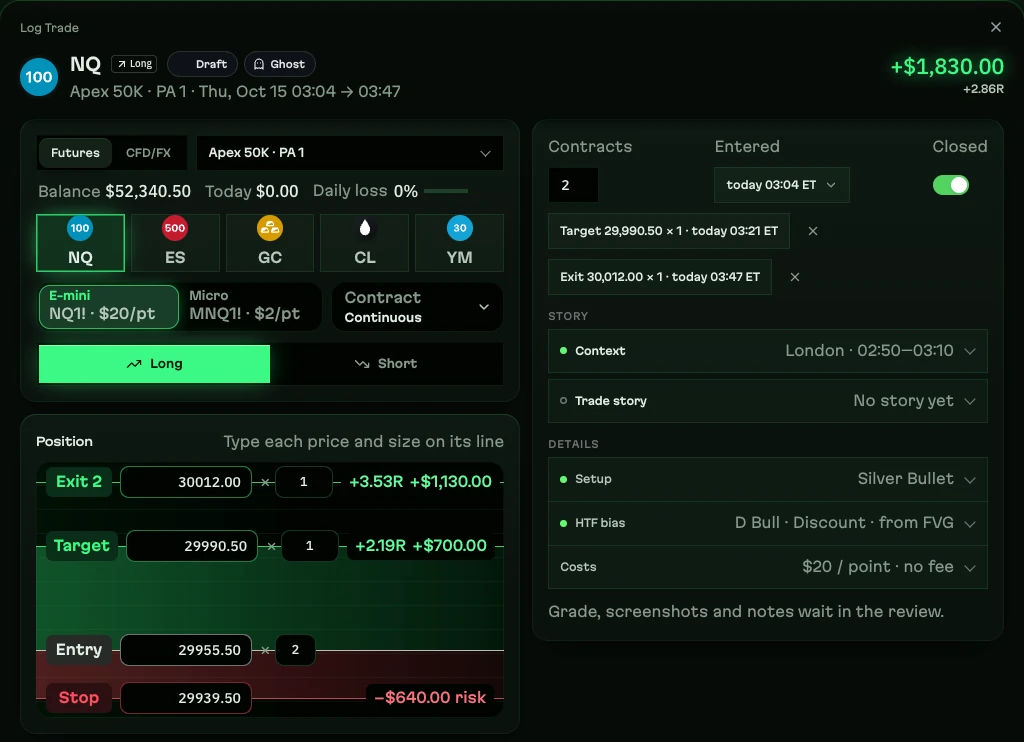
Choose the account and the market, type the entry, stop and exits, and risk, R and P&L appear in dollars from the contract's own point value: $20 a point for NQ, $2 for MNQ, $50 for ES. The ticket shows the account's balance and daily loss as you go.
Futures trades are dated by the New York trading day. A forex or CFD prop account follows its firm's daily reset, so a change of your own time zone never moves a floor.
Imports instead of retyping
Futures accounts can import a Tradovate CSV: fills are matched first in, first out per broker account and contract, the preview lists every row before anything is saved, and the same file twice adds nothing. Forex and CFD accounts import statement files from MT4, MT5, cTrader, Match-Trader, FTMO MetriX and others, read in your browser and never uploaded.
A prop trading day in daqverse
Step 1
Before the open
Check each account's room left and decide GO or NO-GO in the Daily Plan.
Step 2
Before each trade
Size it with the risk calculator against the account's limits.
Step 3
After each trade
Log it; the balance, the floor and the daily loss update at once.
Step 4
At the end of the day
See the trailing floor's new level and the days left to a payout or a target.
Step 5
When a stage passes
Advance the account and keep the evaluation's history and cost.
What daqverse does not do
- The numbers are estimates from your saved trades and the rules you typed, not live equity from your broker or your firm.
- daqverse never blocks an order at your broker; its warnings are reminders, and your firm's dashboard is the one that counts.
- Presets are a starting point: they identify a firm and fill in typical rules, but they do not verify your firm's current rules.
Questions
What is a prop firm trading journal?
A trading journal that keeps a funded or evaluation account's rules next to its trades: the drawdown floor and how it trails, the daily loss limit, the profit target, consistency and payout rules. After each trade it shows how much room is left, so the rules guide the next decision instead of ending the account.
Which prop firms does daqverse support?
Any firm, because you type its rules in. Presets fill in typical rules for 15 futures firms, including Topstep, Apex Trader Funding, Take Profit Trader, Tradeify, Lucid Trading, My Funded Futures, Bulenox and Earn2Trade, and 9 forex and CFD firms, including FTMO, FundedNext, Funding Pips and The5ers. daqverse is not affiliated with any of them.
Can it track a trailing drawdown that stops at the starting balance?
Yes. For each stage you choose whether the floor is static, trails and never stops, stops at the starting balance, stops at the start plus an amount, or stops at a balance the firm names, and whether it trails the end-of-day balance or the intraday peak.
Can I track several prop accounts at once?
Yes. Each account has its own firm, plan, size, stage and rules, and the Accounts page shows all of them with the room left on each. Lifetime totals for costs, payouts and certificates add up across them.
Are the account numbers exact?
No. Balances, floors and the room left are estimates worked out from the trades you log and the rules you enter, not live broker equity or your firm's official figures. Your firm's own dashboard is the one that counts.
Does daqverse connect to my broker or my prop firm?
No. There is no live broker connection and no market data feed. Trades come in through the Quick Log right after the close, a Tradovate CSV for futures accounts, or a statement file (MT4, MT5, cTrader, Match-Trader and others) for forex and CFD accounts. Statement files are read in your browser and never uploaded.
How do I get access, and what does it cost?
daqverse is in early access. You request a place with a Gmail address and what you trade, and invites go out by email in small groups. It costs nothing while you are in the beta and no card is asked for. Paid plans are not open yet; beta testers get a discount when they open.
Keep your next prop account inside its limits
daqverse is in early access: request a place and we email you an invite. Already invited? Log in.
Keep exploring
- Prop firm drawdown calculatorWork out where your prop account's drawdown floor sits after each day: intraday trailing, end-of-day trailing or static, with your firm's rules as inputs.
- ICT trading journalA trading journal for ICT traders: every trade tagged with its New York kill zone and macro, a daily plan, a live session view and reviews by setup.
- NQ futures trading journalJournal NQ and MNQ trades with points, ticks and dollars worked out, New York sessions and kill zones on every trade, and key levels for the Nasdaq.
- Apex Trader Funding journalJournal your Apex Trader Funding accounts: drawdown, daily loss and payout rules tracked from your trades. Independent, not affiliated with Apex Trader Funding.
- Topstep journalJournal your Topstep accounts: drawdown, daily loss and payout rules tracked from your trades. Independent, not affiliated with Topstep.
- Lucid Trading journalJournal your Lucid Trading accounts: drawdown, daily loss and payout rules tracked from your trades. Independent, not affiliated with Lucid Trading.
- Tradeify journalJournal your Tradeify accounts: drawdown, daily loss and payout rules tracked from your trades. Independent, not affiliated with Tradeify.
- MyFundedFutures journalJournal your MyFundedFutures accounts: drawdown, daily loss and payout rules tracked from your trades. Independent, not affiliated with MyFundedFutures.
- Take Profit Trader journalJournal your Take Profit Trader accounts: drawdown, daily loss and payout rules tracked from your trades. Independent, not affiliated with Take Profit Trader.
- Futures position size calculatorHow many contracts for your risk: enter dollars at risk and your stop in points or ticks for NQ, MNQ, ES, MES, YM, GC or CL. Free, no sign-up.
- Best trading journal for ICT tradersTradeZella, Tradervue, Edgewonk, TraderSync and daqverse compared for ICT and prop firm futures traders: what each does well, checked on their own sites.