ICT trading journal
The ICT trading journal that tags every trade by kill zone
daqverse is a trading journal built for ICT and prop-firm futures traders: it tags every trade with its New York kill zone and tracks each prop account's drawdown rules. Most journals were built for any style of trading, so an ICT trader ends up typing the session, the macro and the setup into a notes field and never looking at them again. daqverse starts from the New York clock instead: the kill zones, the macros, the opening gaps and the levels you mark each morning are part of the app, so every trade you log already knows where it happened.
That turns a pile of notes into answers. After a few weeks you can see which kill zone actually pays you, which setup holds up in the New York AM session and which one only works on paper.
Updated
Who it is for
Traders who learn and use ICT concepts
You think in kill zones, fair value gaps, liquidity and premium and discount, and you want your journal to speak the same language without forcing it on you.
Index futures traders on New York time
You trade NQ, ES or their micros, mostly around the 09:30 open, and you want every trade timed on the New York clock wherever you live.
Prop firm traders on an evaluation or funded account
You need to know the room left before your next trade, not after the account is gone.
Traders who are still finding their model
You want to compare setups and sessions on your own data before you commit to one way of trading.
What the journal does for an ICT trader
Each part below is a real page in the app today. The pictures come from daqverse's sample data, not from anyone's account.
Kill zones and macros on the New York clock
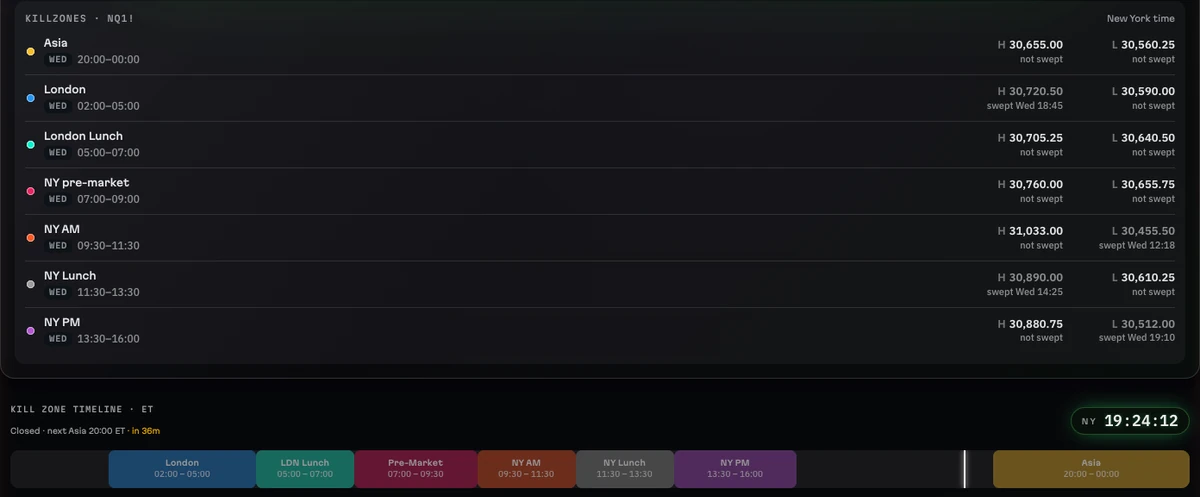
daqverse times the day the way ICT traders do. Asia runs 20:00 to 00:00, London 02:00 to 05:00, New York AM 09:30 to 11:30, New York lunch 11:30 to 13:30 and New York PM 13:30 to 16:00, all in New York time, with London lunch and the New York pre-market drawn as quieter bands. Thirty-eight macro windows sit on the same clock, and you can add kill zones of your own.
When you log a trade, the app reads the entry time, converts it from your own time zone to New York time and saves the kill zone and the macro window with the trade. You never pick them from a list, so they are never forgotten or guessed later.
ICT kill zones explainedLive kill zone clock
A morning routine: brief, plan, GO or NO-GO
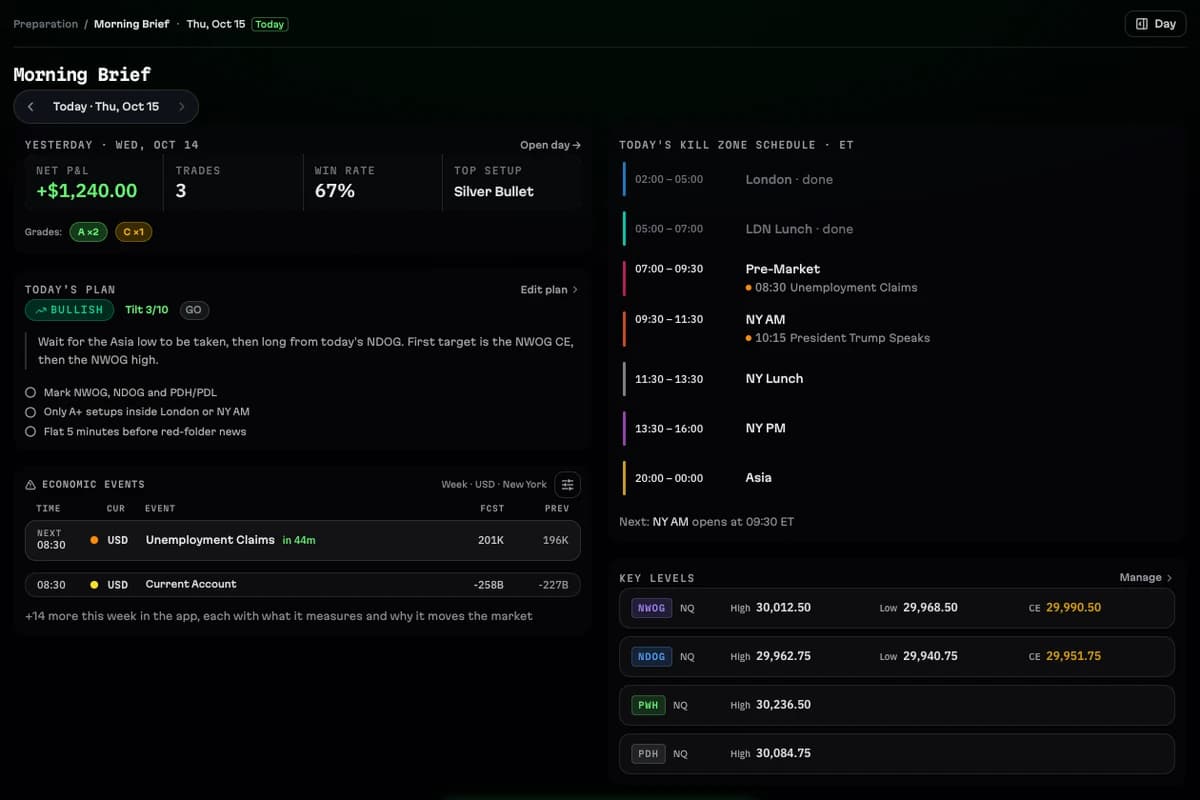
The Morning Brief puts the day in one screen: yesterday's result, the red-folder US news with a countdown to the next release, the kill zone schedule and the levels you are watching. The Daily Plan holds your bias, the game plan in your own words, a short checklist and a tilt check, and it ends in a clear GO or NO-GO before the open.
On Sunday the Weekly Plan sets the week's bias, narrative and focus. After each close, Session Review ends the day with three prompts and a clarity score, and Weekly Review sets the week's numbers beside that plan.
Key levels on one price scale
Key Levels keeps the reference prices an ICT trader marks every day on one sorted list: the prior day, week and month highs and lows, each kill zone's high and low, the new week and new day opening gaps (NWOG and NDOG) and the regular-hours gap with their consequent encroachment (CE) and quarters, and the midnight, 08:30 and 09:30 opens.
For NQ the levels arrive by themselves from a TradingView script, with the time each one was swept. You can add levels of your own for any market, and a trade can carry the levels it used, so you can later ask whether your entries at a gap's CE beat your entries at a prior day's high.
- NWOG, NDOG and the RTH gap with CE and quarters
- PDH and PDL, prior week and month highs and lows
- Session and kill zone highs and lows, swept or not
- Midnight, 08:30 and 09:30 opens
A trade log that takes seconds, with the story added later
The Quick Log asks only for what the math needs: market, direction, entry, stop, exits and size. Risk, R and P&L work themselves out, or you keep the P&L your broker reported. Everything else can wait for the review.
When you review, the trade's story has fields an ICT trader actually uses: the higher-timeframe bias and the array price was delivering from, premium or discount, the draw on liquidity, reversal or continuation, confluences, your grade and your emotions. Your setups live in the Playbook with their criteria, their time windows and a minimum R:R, and each trade keeps the checklist it was taken with, even after you change the model.
Analytics by kill zone, macro and setup
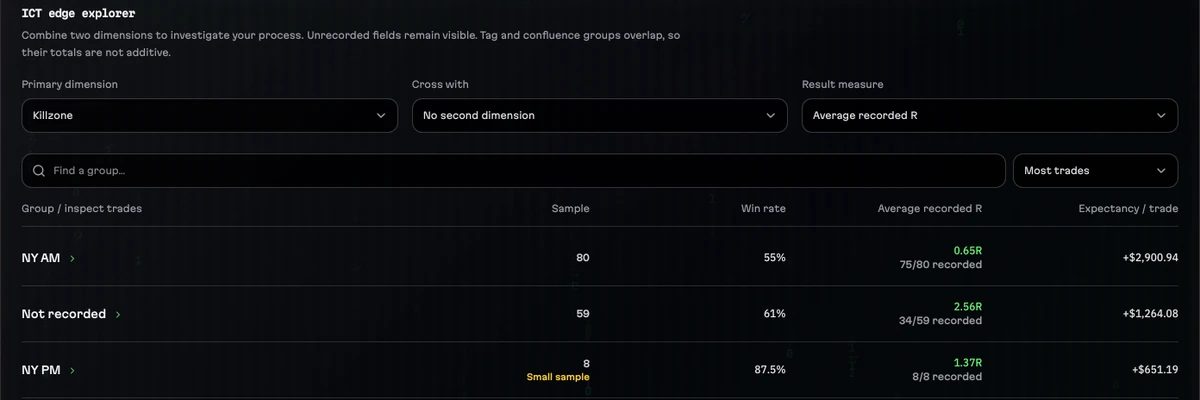
The ICT edge view in Analytics groups your trades by any of more than twenty fields and crosses two of them: kill zone by setup, macro window by direction, premium or discount by result. Each group shows its sample size, win rate, net P&L or average R and expectancy, and small samples are flagged so you do not build a rule on three trades.
Other views cover performance, execution, risk and behaviour, such as what happens to your trades after a loss on the same day. Trades with a field left empty stay visible as 'not recorded' instead of quietly disappearing.
How an ICT trading day runs in daqverse
Step 1
Before the open
Read the Morning Brief, mark your levels and decide GO or NO-GO in the Daily Plan.
Step 2
In the session
Live Session shows the kill zone that is open, the next macro, your risk calculator and the daily loss meter.
Step 3
After each trade
Log it in the Quick Log; the kill zone and macro are saved from the entry time.
Step 4
After the close
Grade the trade, fill in its story, and close the day in Session Review.
Step 5
On Sunday
Review the week against your plan and set the next week's bias.
What daqverse does not do
- daqverse records and reviews your trading; it does not place trades, connect to a broker or stream prices.
- It is not an ICT course. The guides on this site explain the ideas in plain words and link to ICT's own free videos.
- Nothing here is financial advice, and no setup or kill zone is promised to make money.
Questions
What is an ICT trading journal?
A trading journal that records the things ICT traders care about with each trade: the kill zone and macro window in New York time, the setup and its criteria, the levels and gaps it traded from, and the higher-timeframe bias. That lets you measure which sessions and setups actually work for you.
Do I have to trade ICT to use daqverse?
No. It is made for ICT traders first, so kill zones, macros and levels such as PDH, PDL and the NWOG are built in, but any style can be journaled. Your own setups go in the Playbook, and the ICT parts stay out of the way if you do not use them.
Which kill zone times does daqverse use?
Asia 20:00–00:00, London 02:00–05:00, New York AM 09:30–11:30, New York lunch 11:30–13:30 and New York PM 13:30–16:00, all in New York time, plus London lunch and the New York pre-market as quieter bands. You can add kill zones of your own if you draw them differently.
My time zone is not New York. Does that matter?
No. You choose your zone in Settings and the app shows times there, while the kill zones, macros and news stay anchored to New York, as the market runs. The entry time you type is converted to New York time before the kill zone and macro are tagged.
Does daqverse connect to my broker or my prop firm?
No. There is no live broker connection and no market data feed. Trades come in through the Quick Log right after the close, a Tradovate CSV for futures accounts, or a statement file (MT4, MT5, cTrader, Match-Trader and others) for forex and CFD accounts. Statement files are read in your browser and never uploaded.
Does it handle forex and CFDs as well as futures?
Yes. Futures come first, with NQ, ES, YM, CL and GC and their micros built in. Forex and CFD trades have their own MT5-style ticket, in USD, EUR or GBP accounts, and are dated in the time zone you choose in Settings.
How do I get access, and what does it cost?
daqverse is in early access. You request a place with a Gmail address and what you trade, and invites go out by email in small groups. It costs nothing while you are in the beta and no card is asked for. Paid plans are not open yet; beta testers get a discount when they open.
Journal your next kill zone in daqverse
daqverse is in early access: request a place and we email you an invite. Already invited? Log in.
Keep exploring
- NQ futures trading journalJournal NQ and MNQ trades with points, ticks and dollars worked out, New York sessions and kill zones on every trade, and key levels for the Nasdaq.
- Prop firm trading journalA journal for prop firm futures traders: each account's drawdown floor, daily loss limit and payout rules tracked from your own trades, as you set them.
- ICT kill zonesWhat the ICT kill zones are, their New York times (Asia, London, New York AM and PM), why they move with daylight saving, and how to journal them.
- Fair value gap (FVG)What a fair value gap is, how to mark one on three candles, its consequent encroachment, and how to log and review FVG trades in a journal.
- ICT kill zone clockThe ICT kill zones and macros in New York time, live: which window is open now, the next one with a countdown, and the times in your own time zone.
- Best trading journal for ICT tradersTradeZella, Tradervue, Edgewonk, TraderSync and daqverse compared for ICT and prop firm futures traders: what each does well, checked on their own sites.