YM futures trading journal
A YM futures trading journal for Dow traders
daqverse is a trading journal built for ICT and prop-firm futures traders: it tags every trade with its New York kill zone and tracks each prop account's drawdown rules. The E-mini Dow moves in whole points: one point is the smallest tick, worth $5 on YM and $0.50 on the micro, MYM. That makes its arithmetic simpler than the S&P's or the Nasdaq's, but a Dow trade still needs the same record: the right dollars, the right trading day and the session it happened in.
In daqverse you pick YM or MYM, type the prices, and points, R and dollars come from the contract. Each trade carries its New York kill zone and ICT macro window, so your Dow trades can be read by session, by setup or next to the other index futures you trade.
Updated
Past results don't guarantee future results; sample data is illustrative. Risk disclaimer.
Who it is for
YM and MYM traders
The E-mini Dow or its micro, the continuous contract or a dated one, a single entry or a scaled position.
Traders of more than one index
You trade the Dow beside the S&P or the Nasdaq and want to see which one your trading fits.
Prop firm futures traders
Your YM trades sit on evaluation or funded accounts with a floor, a daily loss limit and a payout schedule.
What the journal does for YM
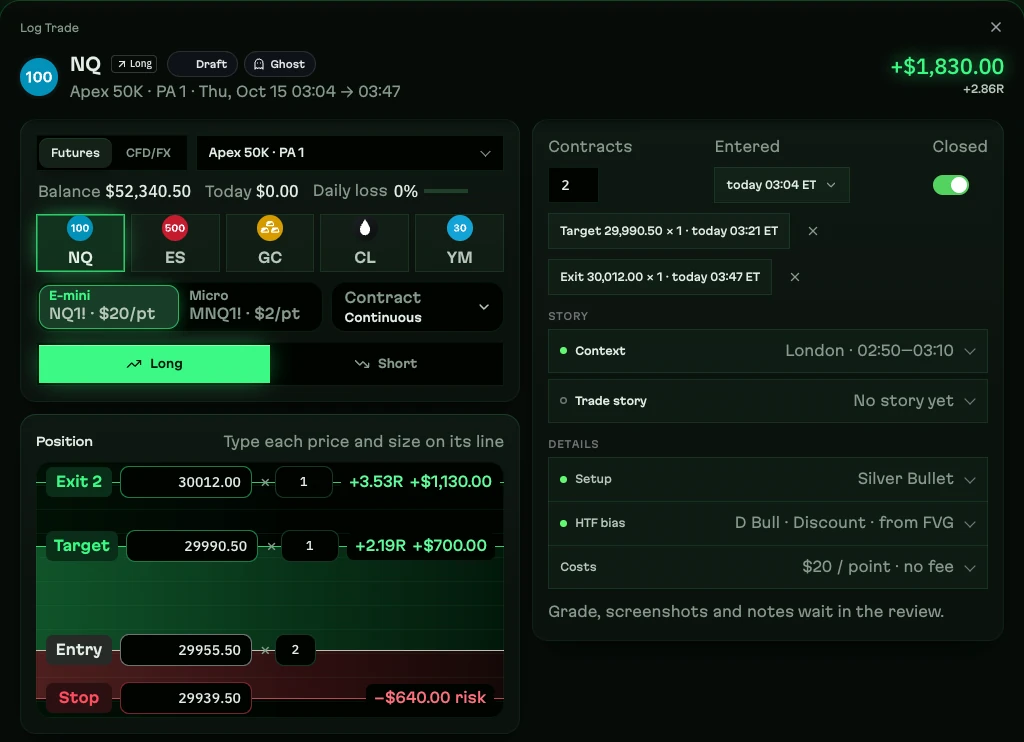
Every part below is in the app today. The pictures show daqverse's sample data, which is mostly NQ; Dow trades use the same screens with YM's own values.
Whole-point ticks worked out in dollars
YM is $5 a point and its tick is one full point; MYM is $0.50 a point with the same one-point tick. Log against the continuous contract (YM1!) or a dated one such as YMZ2026: both count as YM, and MYM keeps its own line in your statistics.
Entry, stop, target and every exit sit on one price ladder with their own size, so a position scaled out in three pieces is three exits, not an average. R and P&L update as you type, fees come off, and the broker's reported P&L can be kept instead.
Kill zones and macros on every Dow trade
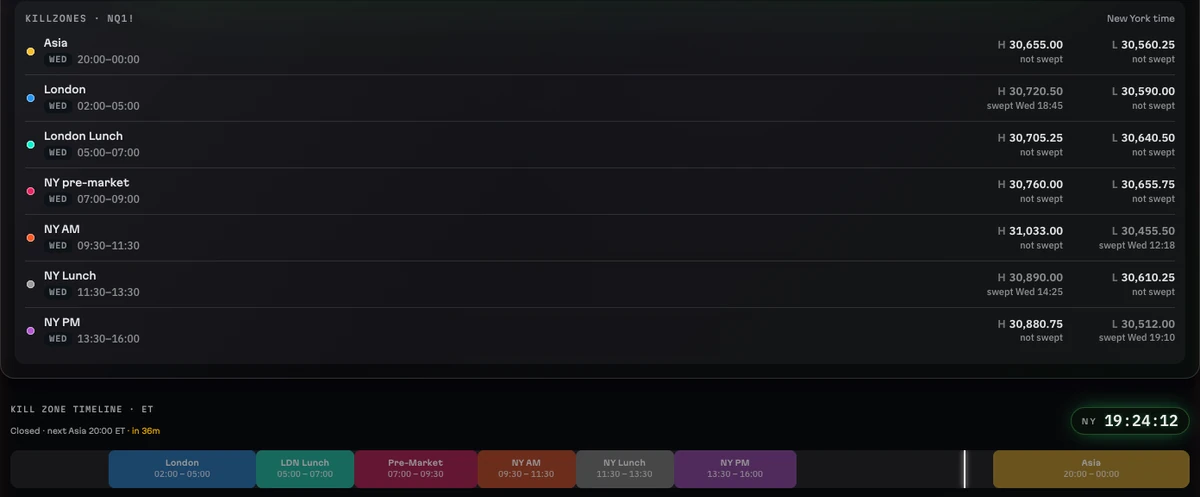
Each trade is tagged from its entry time with its New York kill zone and its ICT macro window. Futures trades are dated on the CME session day: from 18:00 New York time a trade belongs to the next day's session, so the Asia evening sits with the day it leads into.
Live Session shows the kill zone that is open, the next macro with its countdown and the daily loss room on each account while you trade.
Dow next to the S&P and the Nasdaq
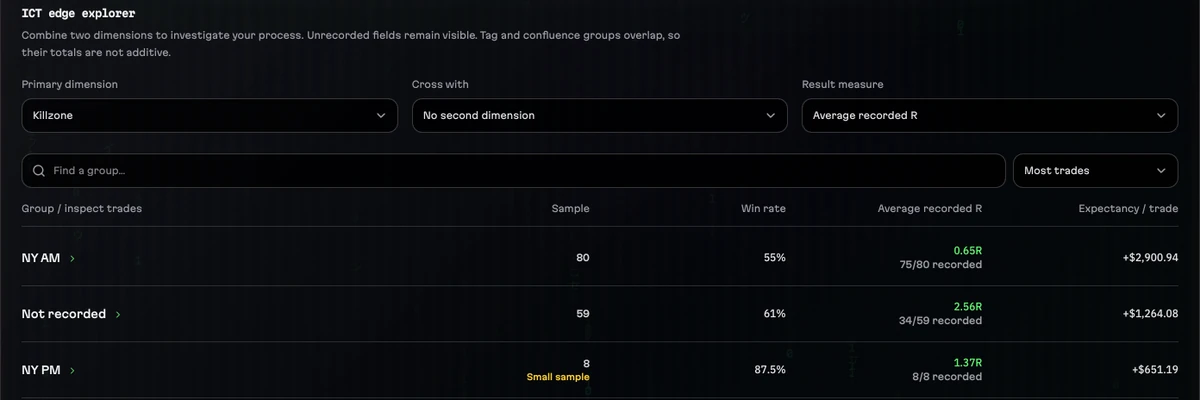
Analytics filters to one instrument or groups by it, so YM, ES and NQ can be compared on your own trades: the number of trades, results, R and the kill zones each one did best and worst in, with small samples marked as small.
The quarterly roll flagged in advance
YM expires on the third Friday of March, June, September and December, like ES and NQ. The news calendar marks each expiry and the roll date eight calendar days before it, and an alert on Home flags the weeks around them, so the move to the next contract shows before it arrives.
A day closed, a week compared
After the close, Session Review grades each trade against your plan and the Journal keeps what you learned. A Tradovate CSV can bring the day's fills in instead of typing them, matched first in, first out per account and contract.
Past results don't guarantee future results; sample data is illustrative. Risk disclaimer.
A Dow session in daqverse
Step 1
Before the open
Check in, read the Morning Brief's US news and set the day to GO or NO-GO.
Step 2
09:30 New York
Live Session counts down the macros and shows each account's room.
Step 3
After each trade
Log YM or MYM: whole points become dollars, the clock gives the kill zone.
Step 4
After the close
Review the session, or import the Tradovate file and review that.
Step 5
Each week
Compare your Dow trades with the other indices in Analytics.
What daqverse does not do
- daqverse has no live price feed and no broker connection: trades come from the Quick Log or an exported file.
- The Key Levels board and its level feed cover NQ and MNQ only; Dow levels are not sent to the app.
- Nothing here is financial advice, and no session or setup is promised to make money.
Questions
What is a tick worth on YM and MYM?
The E-mini Dow (YM) moves in one-point ticks worth $5 per contract. The Micro E-mini Dow (MYM) has the same one-point tick, worth $0.50. daqverse uses these values for risk, R and P&L on every Dow trade.
Can one journal hold YM, ES and NQ together?
Yes. Every futures market in the app sits in the same journal, each with its own contract values, and Analytics can show one instrument alone or compare them.
Which day is an evening YM trade saved under?
Its CME session day in New York time. From 18:00 a trade belongs to the next day's session, as the exchange and futures prop firms count it; a Friday evening keeps its own date, because the market is closed until Sunday 18:00.
Does daqverse connect to my broker or my prop firm?
No. There is no live broker connection and no market data feed. Trades come in through the Quick Log right after the close, a Tradovate CSV for futures accounts, or a statement file (MT4, MT5, cTrader, Match-Trader and others) for forex and CFD accounts. Statement files are read in your browser and never uploaded.
Does it work on a phone?
Yes. daqverse is a web app built at phone width first, so it runs in the browser on a phone or a computer with nothing to install, and you can add it to your Home Screen.
How do I get access, and what does it cost?
daqverse is in early access. You request a place with your email address (Gmail, Outlook, iCloud, Yahoo, Proton or another major provider) and what you trade, and invites go out by email in small groups. It costs nothing while you are in the beta and no card is asked for. Paid plans are not open yet; when they open, everyone with a beta account gets 5 days of free Pro, and 35% off their first payment if they choose a plan in those 5 days.
Journal your next Dow session in daqverse
daqverse is in early access: request a place and we email you an invite. Already invited? Log in.
Keep exploring
- ES futures trading journalJournal ES and MES trades with points, ticks and dollars from the contract, every trade on the CME day in New York time, and its kill zone and macro.
- NQ futures trading journalJournal NQ and MNQ trades with points, ticks and dollars worked out, New York sessions and kill zones on every trade, and key levels for the Nasdaq.
- Prop firm trading journalA journal for prop firm futures traders: each account's drawdown floor, daily loss limit and payout rules tracked from your own trades, as you set them.
- ICT kill zone clockThe ICT kill zones and macros in New York time, live: which window is open now, the next one with a countdown, and the times in your own time zone.
- ICT trading journalA trading journal for ICT traders: every trade tagged with its New York kill zone and macro, a daily plan, a live session view and reviews by setup.